
Restore Namespace Labels and Annotations
Overview
TrilioVault for Kubernetes (trilio) allows you to restore namespace labels and annotations from your backup to the restored namespace during restore operations. This feature ensures that external systems and integrations that depend on namespace metadata continue to function correctly after restore.
Namespace metadata is critical for:
Service mesh configurations (Istio, Linkerd)
Policy enforcement (OPA, Gatekeeper)
Resource quotas and limits
Custom monitoring and alerting rules
RBAC and access control policies
How It Works
During a restore operation, trilio follows this flow:
Backup Phase: When a backup is created, trilio captures the namespace definition including all labels and annotations and stores them as part of the backup.
Restore Phase: During restore, you can configure how these backed-up labels and annotations should be applied to the restored namespace using one of three strategies.
Strategy Application: The selected strategy determines how the backed-up namespace metadata merges with any existing metadata in the restore namespace
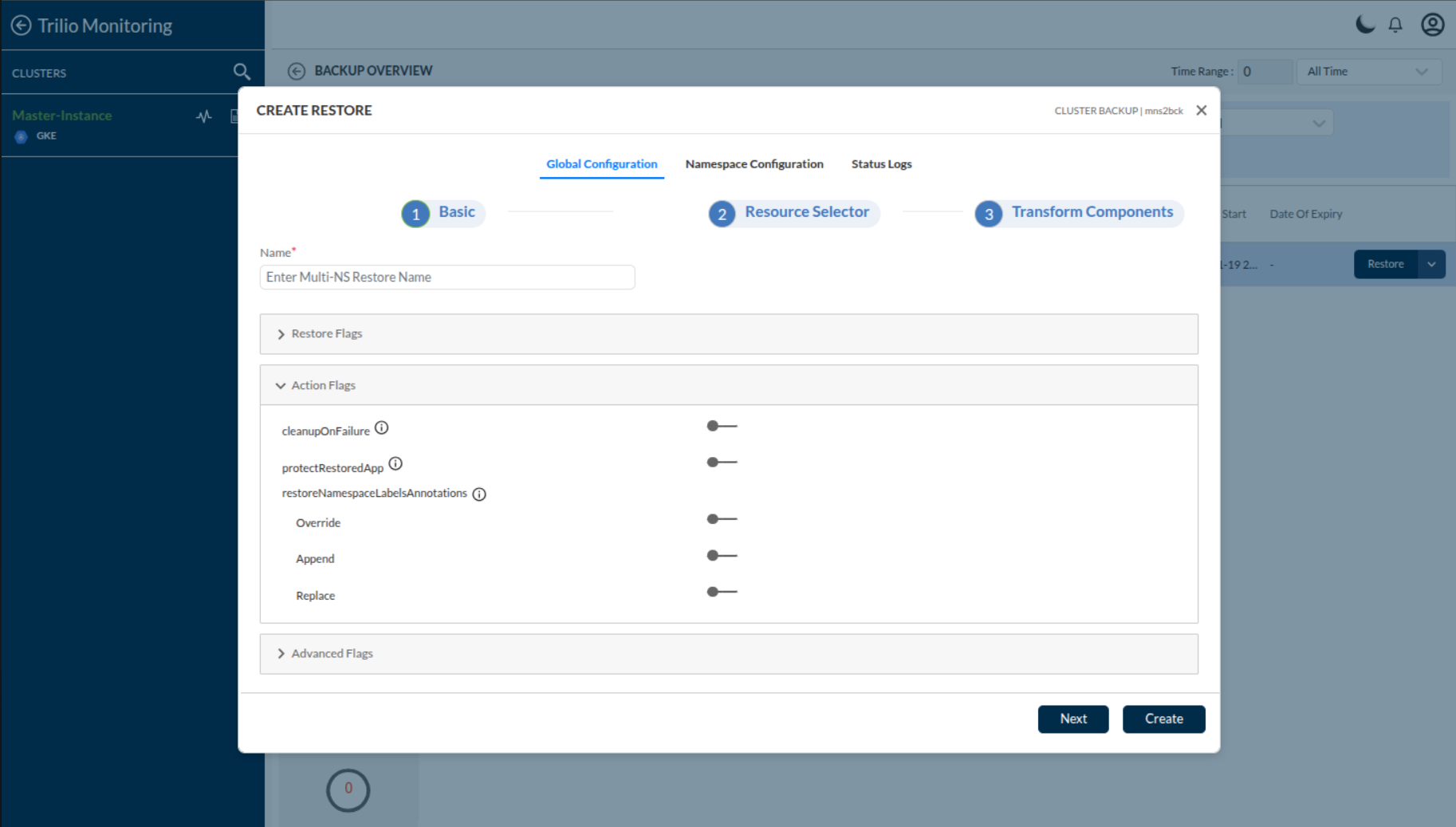
The screenshot above shows the restore configuration UI where you can enable the feature and select your preferred strategy from the dropdown menu.
Understanding the Restoration Strategies
Trilio provides three strategies for restoring namespace labels and annotations. Each strategy defines how backed-up metadata interacts with existing metadata in the restore namespace.
Override Strategy
What it does: Updates values for keys that exist in both the restore namespace and backup, adds missing keys from backup, and preserves existing keys that are not present in backup.
In simple terms:
Updates existing labels/annotations with values from backup
Adds new labels/annotations from backup that don't exist in restore namespace
Keeps existing labels/annotations that are not in backup
When to use: When you want to update namespace metadata to match backup while preserving any additional metadata added during restore.
Example:
The env value is updated from staging to prod, team=backend is added, and region=us-west is preserved.
Append Strategy
What it does: Keeps all existing labels and annotations in the restore namespace and only adds those from backup that are not already present.
In simple terms:
Preserves all existing labels/annotations in restore namespace
Adds only missing labels/annotations from backup
Never updates or removes existing metadata
When to use: When you want to add backup metadata to an existing namespace without modifying or removing any current metadata.
Example:
The existing env=staging and region=us-west are preserved, and only team=backend is added from backup.
Replace Strategy
What it does: Removes all existing labels and annotations from the restore namespace and replaces them entirely with those from backup.
In simple terms:
Removes all existing labels/annotations
Applies only labels/annotations from backup
Complete replacement of namespace metadata
When to use: When you want to exactly replicate the namespace metadata from backup, discarding any modifications made to the restore namespace.
Example:
All existing labels are removed, and only the backup labels are applied.
Configuration
This feature is optional and disabled by default. To enable it, you need to configure restoreNamespaceLabelsAnnotations in your Restore or ClusterRestore resource.
Single Namespace Restore
For a single namespace restore, configure the strategy in the Restore CR:
Cluster Restore
For cluster restore operations, you can configure the strategy at two levels:
Global Configuration
Set a default strategy for all namespaces in the cluster restore:
Per-Namespace Configuration
Override the global configuration for specific namespaces. Component-level configuration takes precedence over global settings:
Configuration Precedence
For cluster restores, the configuration follows this precedence order (highest to lowest):
Component-level configuration (per-namespace in
ClusterRestore.spec.components[])Global configuration (in
ClusterRestore.spec.globalConfig.restoreFlags)Default (feature disabled if not specified)
Example Scenarios
Scenario 1: Service Mesh Integration
When restoring applications with Istio service mesh, restore namespace labels to trigger automatic sidecar injection:
Note: Ensure your backup namespace includes service mesh labels (e.g., istio-injection=enabled) that will be restored.
Scenario 2: Uniform Strategy for All Namespaces
Apply the same restoration strategy to all namespaces in a cluster restore:
Scenario 3: Per-Namespace Strategy Configuration
Apply different strategies to different namespaces based on their requirements:
Result:
production-ns: Uses Replace strategy (exact backup metadata)staging-ns: Uses Override strategy (updates while preserving staging-specific metadata)All other namespaces: Use Append strategy (add backup metadata without modification)
Integration with Transformations
The namespace labels and annotations restoration feature works seamlessly with trilio's transformation framework:
Transformation Phase: JSON Patch transformations are applied first to modify namespace metadata
Restoration Phase: The configured restoration strategy is then applied to the transformed namespace
This allows you to:
Transform environment-specific labels during cross-environment restore (e.g., change
env=prodtoenv=staging)Add new annotations for policy enforcement
Modify existing labels/annotations values
Then restore any missing critical metadata from backup
Important Notes
Missing Namespace Metadata in Backup
If the namespace metadata is not found in the backup:
The restore operation continues normally
A warning is logged indicating that namespace metadata could not be restored
No namespace metadata restoration is performed
Empty Backup Metadata
If the backup namespace has no labels or annotations:
Override strategy: Existing metadata in restore namespace is preserved
Append strategy: Existing metadata in restore namespace is preserved (nothing to add)
Replace strategy: All existing metadata is removed (backup has none)
System-Managed Metadata
System-managed annotations and labels (e.g., kubernetes.io/managed-by) may be automatically modified by Kubernetes after restore. The restoration feature focuses on restoring user-defined business metadata.
Best Practices
Choose the Right Strategy:
Use Replace when you need an exact replica of backup metadata
Use Override when you want to update metadata while preserving additions
Use Append when you want to add backup metadata without modifying existing values
Test in Non-Production:
Test the chosen strategy with sample namespaces before applying to production
Verify that external systems (service mesh, policies) recognize the restored metadata correctly
Monitor After Restore:
Verify that service mesh, policy engines, and monitoring systems recognize the restored namespace metadata correctly
Multi-Namespace to Single Restore Namespace Scenario
When multiple backup namespaces (e.g., backup1, backup2) map to a single restore namespace, understanding the restoration behavior is important for predictable results.
Sequential Processing Behavior
The restore processes each backup namespace sequentially against the same restore namespace:
First:
backup1namespace metadata is merged with the restore namespace using the selected strategy (Append, Override, or Replace)Then:
backup2namespace metadata is merged with the (now potentially modified) restore namespace using the same strategy
Each backup namespace is processed independently against the restore namespace using the configured strategy. The order of processing is non-deterministic and depends on restore execution factors.
In simple terms:
Each backup namespace applies its metadata to the restore namespace one after another
The restore namespace accumulates changes from each backup namespace sequentially
The final result depends on the order in which backup namespaces are processed
Example:
Customization via Transformations
To control the final result when multiple backup namespaces map to a single restore namespace, use transformations to modify backup namespace metadata before the strategy is applied. This allows you to:
Preprocess backup namespace metadata before merging
Resolve conflicts between multiple backup namespaces
Ensure consistent final metadata regardless of processing order
Apply environment-specific modifications to each backup namespace