> For the complete documentation index, see [llms.txt](https://docs.trilio.io/kubernetes/llms.txt). Markdown versions of documentation pages are available by appending `.md` to page URLs; this page is available as [Markdown](https://docs.trilio.io/kubernetes/user-guide/getting-started-with-management-console/navigating-intro/trilio-manager-ui-guide.md).
# Trilio Manager settings
The **Trilio Manager** page is accessible from **Settings > Trilio Manager** in the TrilioVault for Kubernetes (TVK) UI. It provides a centralized interface to configure the behaviour of your TVK installation. Changes made on this page updates the `TrilioVaultManager` Custom Resource on the cluster.
***
## 1. TVK Basic Configuration
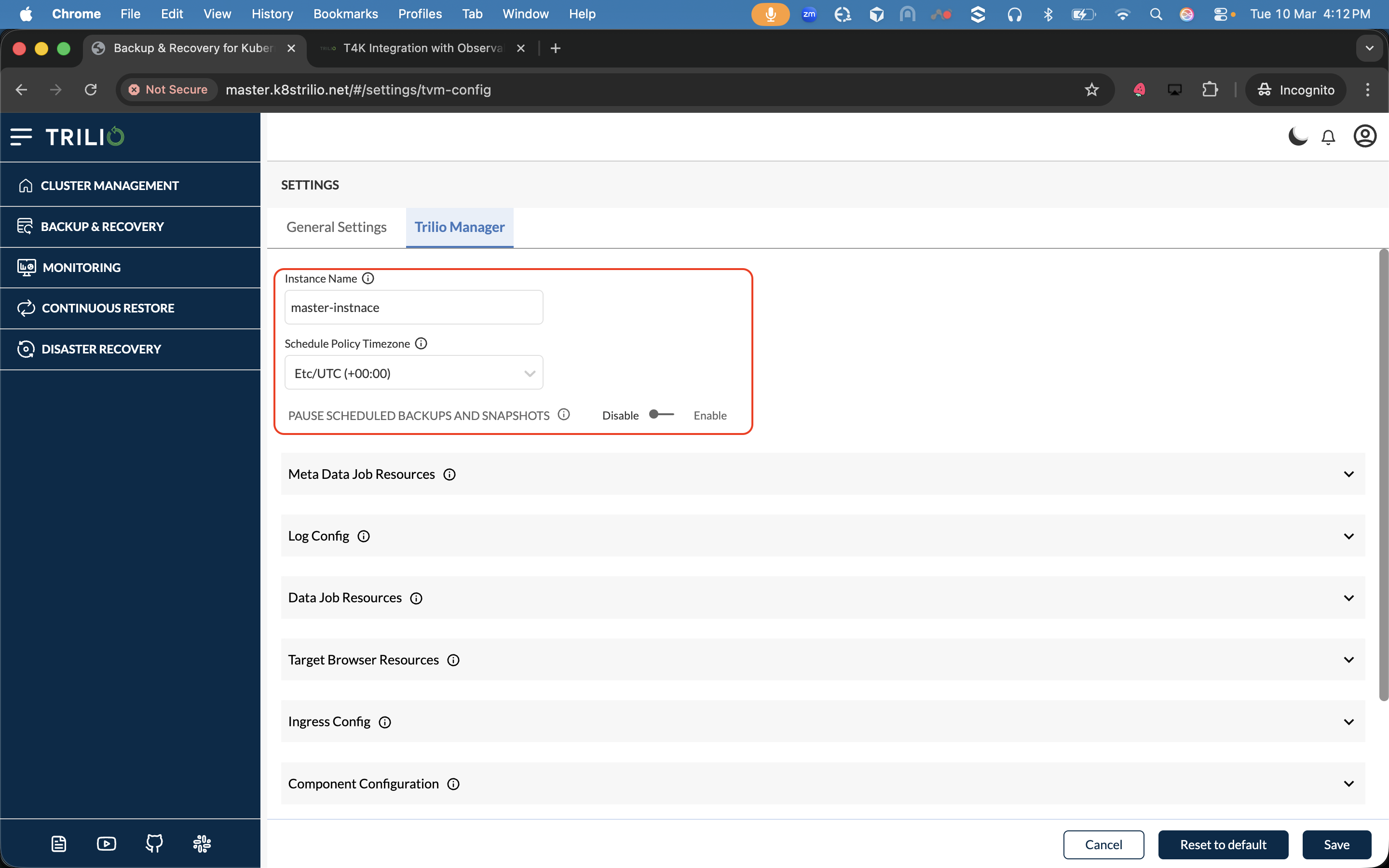
These top-level fields control the identity and global scheduling behaviour of the TVK installation.
Basic Configuration
### 1.1 Instance Name
| Property | Value |
| -------------- | ----------------------------------------- |
| **Field** | `tvkConfig.name` |
| **CR Path** | `spec.tvkInstanceName` |
| **Type** | String |
| **Required** | Yes |
| **Validation** | Must follow Kubernetes naming conventions |
**Description:** A display name for this TVK installation cluster. This name is shown in the TVK UI header and is useful when managing multiple TVK instances across clusters or in multi-cluster environments.
**Where it is used:**
* Displayed in the TVK web UI as the installation identifier.
* Used in the Continuous Restore service to distinguish source/destination sites.
* Must be unique across TrilioVaultManager instances (enforced by the validating webhook).
***
### 1.2 Schedule Policy Timezone
| Property | Value |
| ------------ | ------------------------------------------------------------------- |
| **Field** | `tvkConfig.schedulePolicyTimezone` |
| **CR Path** | `spec.helmValues.schedulePolicyTimezone` (propagated to TVK config) |
| **Type** | String (IANA timezone, e.g. `Asia/Kolkata`, `America/New_York`) |
| **Required** | No |
**Description:** The timezone used for all scheduled Backups and Snapshots. When a schedule policy defines a cron expression (e.g. "every day at 2 AM"), this timezone determines what "2 AM" means.
**Where it is used:**
* The BackupPlan and ClusterBackupPlan controllers read this value to calculate the next scheduled backup/snapshot trigger time.
* The retention policy expiry calculator uses this timezone for time comparisons.
* Affects all BackupPlans that use schedule policies.
***
### 1.3 Pause Scheduled Backups and Snapshots
| Property | Value |
| ----------- | -------------------- |
| **Field** | `pauseSchedule` |
| **CR Path** | `spec.pauseSchedule` |
| **Type** | Boolean (toggle) |
| **Default** | `false` |
**Description:** A global switch that pauses **all** scheduled backups and snapshots across **every** BackupPlan and ClusterBackupPlan in the cluster.
**Where it is used:**
* The BackupPlan controller checks this flag on every reconciliation. When `true`, it skips triggering any scheduled backups/snapshots.
* The ClusterBackupPlan controller applies the same logic at cluster scope.
* When enabled, `PauseSchedule` is propagated to each BackupPlan's status (`status.pauseSchedule`).
* Immutable backups/snapshots are disabled when the schedule is paused (`isImmutableBackupDisabled = true`), since immutability requires active retention + schedule policies.
* The webhook validates that paused schedules cannot be used to create immutable backups.
**Important:** This does **not** prevent manual (on-demand) backups. Only cron-scheduled backups and snapshots are paused.
***
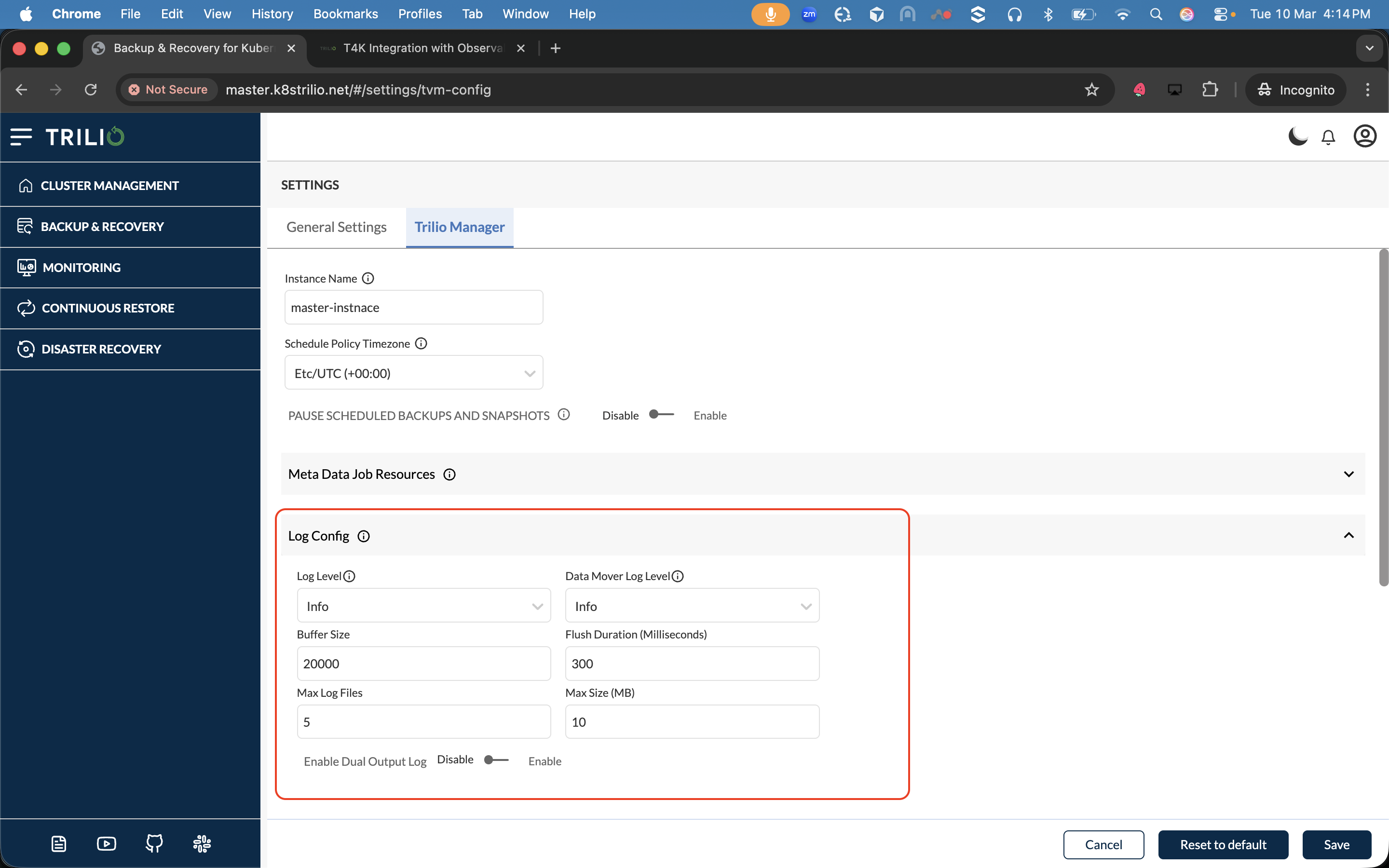
## 2. Log Configuration
Controls logging behaviour for all TVK components and data mover pods.
Log Configuration
### 2.1 Log Level
| Property | Value |
| ------------------ | ----------------------------------------------------------- |
| **Field** | `logConfig.logLevel` |
| **CR Path** | `spec.logConfig.logLevel` |
| **Type** | Enum |
| **Allowed Values** | `Panic`, `Fatal`, `Error`, `Warn`, `Info`, `Debug`, `Trace` |
| **Default** | `Info` |
**Description:** Sets the logging level for TVK control-plane components (controllers, analyzers, webhooks, web-backend).
**Where it is used:**
* All TVK controller pods read this value at startup to configure their logging configuration.
* Changing the level takes effect on the next pod restart or configuration reload.
| Level | When to Use |
| ----------------- | -------------------------------------------------------------- |
| `Panic` / `Fatal` | Only log unrecoverable errors (not recommended for normal use) |
| `Error` | Log errors only |
| `Warn` | Log warnings and errors |
| `Info` | **Recommended for production.** Logs operational messages |
| `Debug` | Verbose output for troubleshooting |
| `Trace` | Extremely verbose; includes low-level flow details |
***
### 2.2 Data Mover Log Level
| Property | Value |
| ------------------ | ----------------------------------------------------------- |
| **Field** | `logConfig.datamoverLogLevel` |
| **CR Path** | `spec.logConfig.datamoverLogLevel` |
| **Type** | Enum |
| **Allowed Values** | `Panic`, `Fatal`, `Error`, `Warn`, `Info`, `Debug`, `Trace` |
| **Default** | `Info` |
**Description:** Sets the logging level specifically for the **data mover** component. The data mover handles the actual data upload and restore operations (reading from PVCs, writing to target storage, and vice versa).
**Where it is used:**
* The data mover (datamover) pods read this value to configure their logger.
* Separate from the main log level because data operations can generate a high volume of logs at `Debug`/`Trace` levels.
***
### 2.3 Buffer Size
| Property | Value |
| ----------- | --------------------------- |
| **Field** | `logConfig.bufferSize` |
| **CR Path** | `spec.logConfig.bufferSize` |
| **Type** | Integer |
| **Range** | 2,000 – 50,000 |
| **Default** | 20,000 |
**Description:** The size of the in-memory log buffer (in bytes) used by TVK components before flushing logs to the output destination (stdout/file).
**Where it is used:**
* A larger buffer reduces the frequency of I/O flush operations, which can improve performance under high log volume.
* A smaller buffer ensures logs are written more promptly, reducing the risk of log loss on crash.
***
### 2.4 Flush Duration (Milliseconds)
| Property | Value |
| ----------- | ------------------------------------------ |
| **Field** | `logConfig.flushDurationMilliSeconds` |
| **CR Path** | `spec.logConfig.flushDurationMilliSeconds` |
| **Type** | Integer |
| **Range** | 100 – 5,000 ms |
| **Default** | 300 ms |
**Description:** The interval (in milliseconds) at which the log buffer is forcefully flushed to the output, regardless of whether the buffer is full.
**Where it is used:**
* Lower values (e.g. 100ms) ensure near-real-time log output, useful during debugging.
* Higher values (e.g. 5000ms) reduce I/O overhead in production environments.
***
### 2.5 Max Log Files
| Property | Value |
| ----------- | ---------------------------- |
| **Field** | `logConfig.maxLogFiles` |
| **CR Path** | `spec.logConfig.maxLogFiles` |
| **Type** | Integer |
| **Range** | 1 – 10 |
| **Default** | 5 |
**Description:** The maximum number of rotated log files to retain. When the current log file reaches the maximum size, it is rotated and a new file is created. The oldest rotated file is deleted once this limit is exceeded.
**Where it is used:**
* Controls disk space usage for log files on TVK pods.
* Only applicable when dual output logging is enabled (logs go to both stdout and files).
***
### 2.6 Max Log File Size (MB)
| Property | Value |
| ----------- | --------------------------------- |
| **Field** | `logConfig.maxLogFileSizeMB` |
| **CR Path** | `spec.logConfig.maxLogFileSizeMB` |
| **Type** | Integer |
| **Range** | 1 – 10 MB |
| **Default** | 10 MB |
**Description:** The maximum size of each individual log file before rotation occurs.
**Where it is used:**
* When a log file reaches this size, it is rotated (renamed) and a new log file is started.
* Works in conjunction with `maxLogFiles` to limit total disk usage to `maxLogFiles × maxLogFileSizeMB`.
***
### 2.7 Enable Dual Output Log
| Property | Value |
| ----------- | ------------------------------------ |
| **Field** | `logConfig.enableDualOutputLog` |
| **CR Path** | `spec.logConfig.enableDualOutputLog` |
| **Type** | Boolean (toggle) |
| **Default** | `false` |
**Description:** When enabled, logs are written to **both** stdout (for `kubectl logs`) and to log files on disk simultaneously.
**Where it is used:**
* Useful when you want persistent log files for post-mortem analysis while also having real-time log streaming via `kubectl logs`.
* When disabled, logs go to stdout only (Kubernetes standard practice).
***
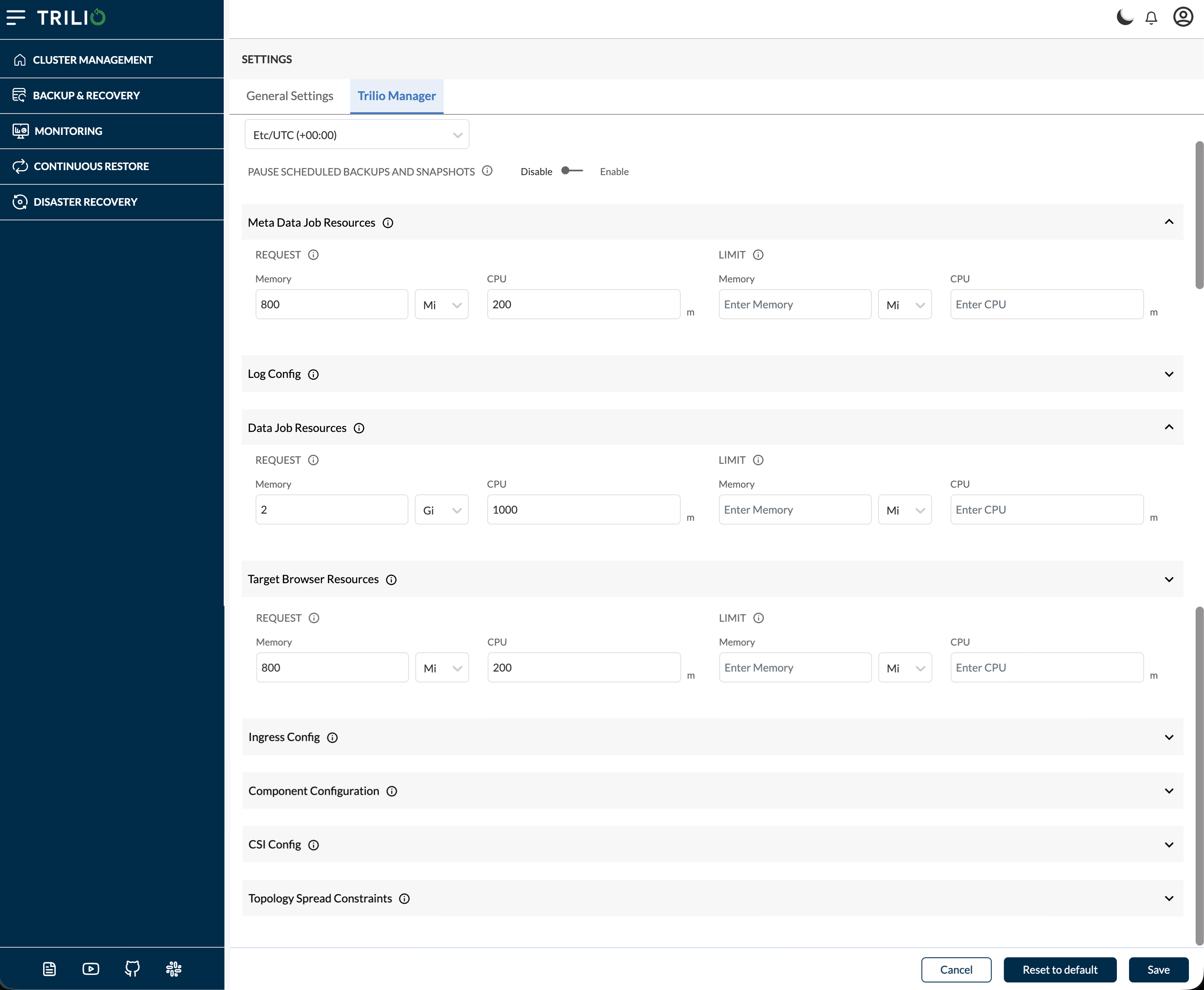
## 3. Resource Configuration
These sections define the Kubernetes resource requests and limits for various TVK job types. Each section has **Requests** (minimum guaranteed resources) and **Limits** (maximum allowed resources), with **Memory** (Mi/Gi) and **CPU** (millicores, `m`) fields.
Resource Configuration
> **Requests** — The minimum compute resources guaranteed to the container. If omitted, defaults to Limits.
> **Limits** — The maximum compute resources the container can consume. The container is throttled (CPU) or killed (Memory) if it exceeds this.
***
### 3.1 Meta Data Job Resources
| Property | Value |
| ----------- | -------------------------------- |
| **Field** | `resources.metadataJobResources` |
| **CR Path** | `spec.metadataJobResources` |
**Description:** Resource requests and limits for all **metadata processing jobs**. These jobs handle metadata operations during backup, snapshot, and restore workflows — for example, reading Kubernetes resource manifests, generating metadata YAML/JSON, uploading metadata to the target, and validating restore metadata.
| Sub-field | Minimum (Requests) | Minimum (Limits) |
| --------- | ------------------ | ---------------- |
| Memory | 10 Mi | 1024 Mi |
| CPU | 10m | 500m |
**Reference:** For the meaning of **Requests** and **Limits** and their validation rules, see [3.1.1](#311-specmetadatajobresourcesrequest) and [3.1.2](#312-specmetadatajobresourceslimit).
**Where it is used:**
* Applied to pods running: metadata snapshot, metadata upload, metadata validation, and metadata restore operations.
* If set too low, metadata jobs may be OOMKilled or throttled, causing backup/restore failures.
#### 3.1.1 spec.metadataJobResources.request
| Property | Value |
| ----------- | ----------------------------------- |
| **CR Path** | `spec.metadataJobResources.request` |
| **Type** | Object (`memory`, `cpu`) |
**Description:** The **minimum** amount of compute resources that Kubernetes guarantees to each metadata job pod. The Kubernetes scheduler uses these values to find a node with sufficient available capacity before placing the pod. If the node cannot satisfy the request, the pod will remain `Pending`.
| Sub-field | CR Path | Type | UI Validation | Description |
| ---------- | ------------------------------------------ | ----------------- | ----------------- | --------------------------------------------------------------------------------------------------------------------------------------------------- |
| **Memory** | `spec.metadataJobResources.request.memory` | String (quantity) | Minimum **10 Mi** | Minimum memory guaranteed to each metadata job pod. Value must be a valid Kubernetes quantity (e.g. `128Mi`, `1Gi`). Must be ≤ Limit memory. |
| **CPU** | `spec.metadataJobResources.request.cpu` | String (quantity) | Minimum **10m** | Minimum CPU guaranteed to each metadata job pod. Value must be a valid Kubernetes quantity in millicores (e.g. `50m`, `200m`). Must be ≤ Limit CPU. |
**Reference:** Kubernetes [ResourceRequirements.requests](https://kubernetes.io/docs/reference/generated/kubernetes-api/v1.23/#resourcerequirements-v1-core); TrilioVaultManager CRD [TrilioVaultManagerSpec](/kubernetes/reference/custom-resource-definition-operator.md#triliovaultmanagerspec) — `spec.metadataJobResources`.
**UI Validation Rules for Request:**
* Memory must be **≥ 10 Mi**.
* CPU must be **≥ 10m**.
* Request Memory must be **≤ Limit Memory** (request cannot exceed the limit).
* Request CPU must be **≤ Limit CPU** (request cannot exceed the limit).
* Values must be valid Kubernetes resource quantity strings.
***
#### 3.1.2 spec.metadataJobResources.limit
| Property | Value |
| ----------- | --------------------------------- |
| **CR Path** | `spec.metadataJobResources.limit` |
| **Type** | Object (`memory`, `cpu`) |
**Description:** The **maximum** amount of compute resources a metadata job pod is allowed to consume. If the pod tries to use more memory than the limit, the container is **OOMKilled** (restarted). If the pod tries to use more CPU than the limit, it is **throttled** (slowed down) but not killed.
| Sub-field | CR Path | Type | UI Validation | Description |
| ---------- | ---------------------------------------- | ----------------- | ------------------- | --------------------------------------------------------------------------------------------------------------------------------------------------------------------------- |
| **Memory** | `spec.metadataJobResources.limit.memory` | String (quantity) | Minimum **1024 Mi** | Maximum memory the metadata job pod can use before being OOMKilled. Value must be a valid Kubernetes quantity (e.g. `1024Mi`, `2Gi`). Must be ≥ Request memory. |
| **CPU** | `spec.metadataJobResources.limit.cpu` | String (quantity) | Minimum **500m** | Maximum CPU the metadata job pod can consume before being throttled. Value must be a valid Kubernetes quantity in millicores (e.g. `500m`, `1000m`). Must be ≥ Request CPU. |
**Reference:** Kubernetes [ResourceRequirements.limits](https://kubernetes.io/docs/reference/generated/kubernetes-api/v1.23/#resourcerequirements-v1-core); TrilioVaultManager CRD [TrilioVaultManagerSpec](/kubernetes/reference/custom-resource-definition-operator.md#triliovaultmanagerspec) — `spec.metadataJobResources`.
**UI Validation Rules for Limit:**
* Memory must be **≥ 1024 Mi**.
* CPU must be **≥ 500m**.
* Limit Memory must be **≥ Request Memory** (limit cannot be set below the request).
* Limit CPU must be **≥ Request CPU** (limit cannot be set below the request).
* Values must be valid Kubernetes resource quantity strings.
***
### 3.2 Data Job Resources
| Property | Value |
| ----------- | ---------------------------- |
| **Field** | `resources.dataJobResources` |
| **CR Path** | `spec.dataJobResources` |
**Description:** Resource requests and limits for all **data processing jobs**. These jobs handle the actual data movement — reading data from PVCs, compressing, deduplicating, and uploading to the target during backup, or downloading and writing data during restore.
| Sub-field | Minimum (Requests) | Minimum (Limits) |
| --------- | ------------------ | ---------------- |
| Memory | 800 Mi | 5120 Mi (5 Gi) |
| CPU | 100m | 1500m |
**Reference:** For the meaning of **Requests** and **Limits**, see [3.1.1](#311-specmetadatajobresourcesrequest) and [3.1.2](#312-specmetadatajobresourceslimit).
**Where it is used:**
* Applied to data mover pods that perform data upload and data restore operations.
* Data jobs are the most resource-intensive TVK workloads. Undersizing them leads to OOMKill during large data transfers.
* For large PVCs (tens of GBs), increasing these limits can significantly improve backup/restore throughput.
***
### 3.3 Target Browser Resources
| Property | Value |
| ----------- | ---------------------------------- |
| **Field** | `resources.targetBrowserResources` |
| **CR Path** | `spec.targetBrowserResources` |
**Description:** Resource requests and limits for **target browser** deployments. The target browser is a long-running deployment (one per Target) that provides read access to the backup target storage, enabling the UI and API to browse available backups and snapshots on the target.
| Sub-field | Minimum (Requests) | Minimum (Limits) |
| --------- | ------------------- | ------------------- |
| Memory | 64 Mi | 256 Mi |
| CPU | No minimum enforced | No minimum enforced |
**Reference:** For the meaning of **Requests** and **Limits**, see [3.1.1](#311-specmetadatajobresourcesrequest) and [3.1.2](#312-specmetadatajobresourceslimit).
**Where it is used:**
* Applied to the target browser deployment pod for each Target CR.
* These pods are relatively lightweight but must stay running to serve target browsing requests.
***
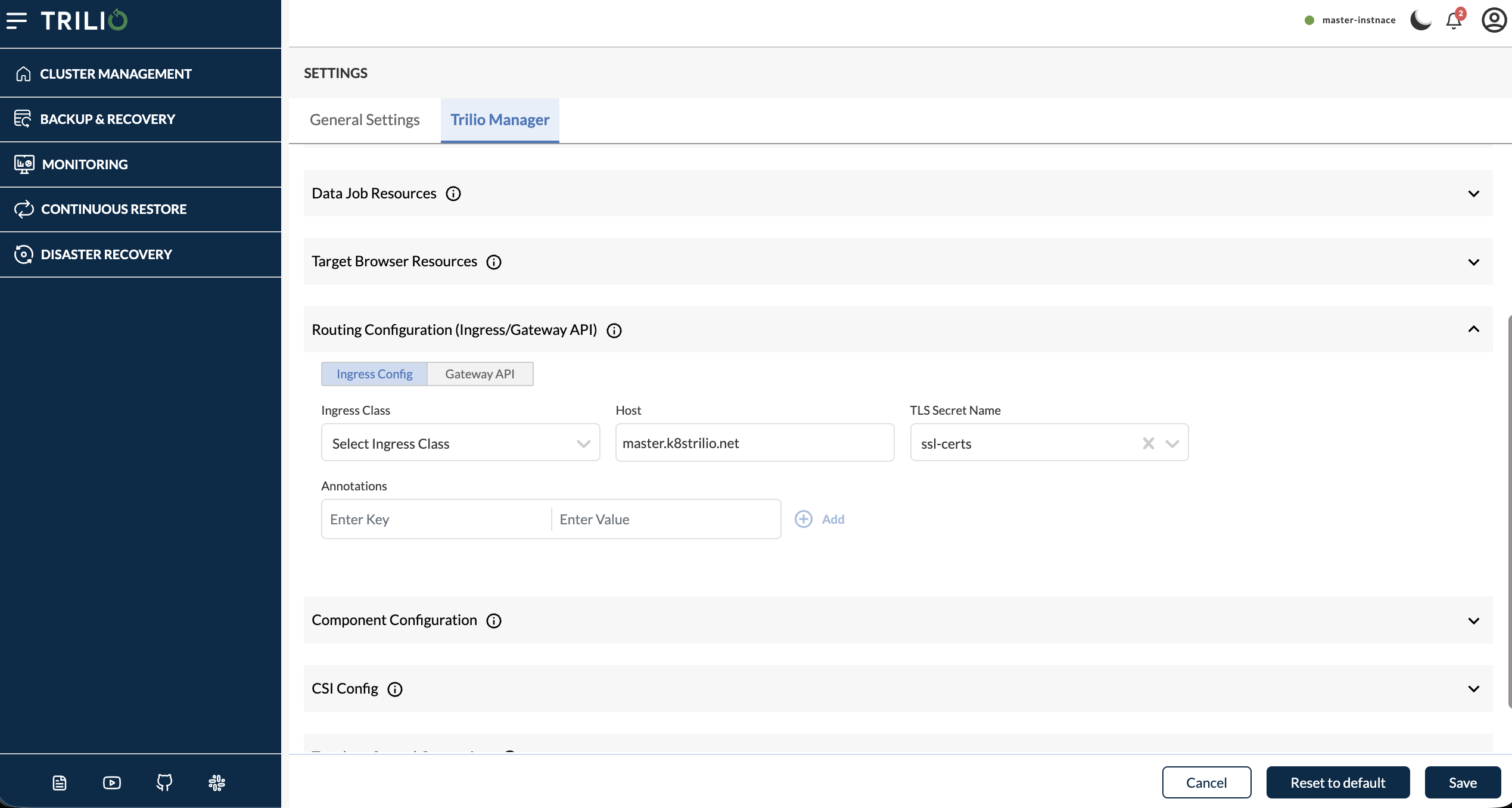
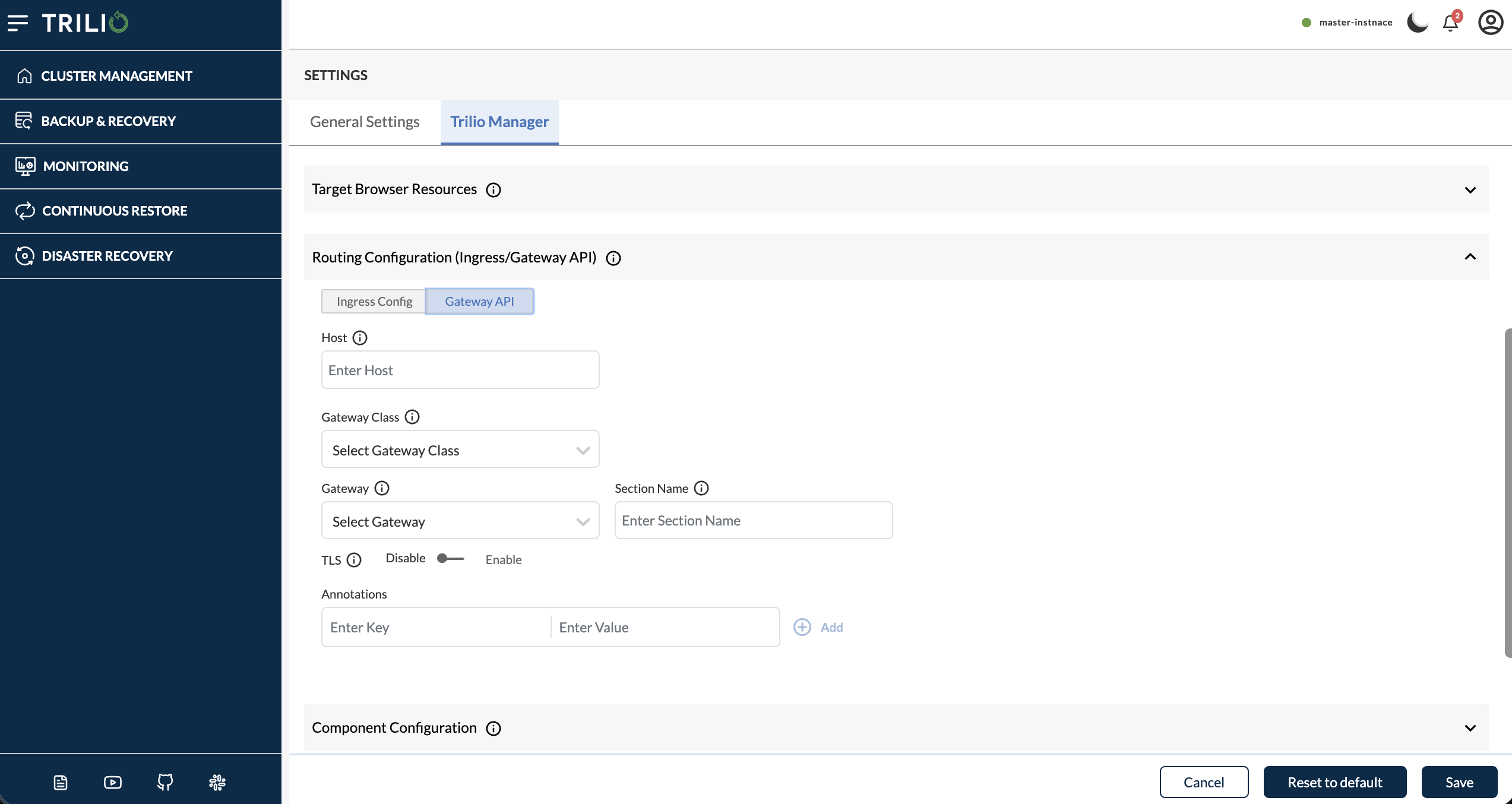
## 4. Routing Configuration (Ingress/Gateway API)
Configures how external traffic reaches the TVK web UI. Use the **Ingress Config** / **Gateway API** toggle to select the routing mode. Only one mode is active at a time.
{% hint style="info" %}
**Gateway API** is not available on OpenShift. On OpenShift clusters, only **Ingress Config** is shown.
{% endhint %}
|
RoutingConfiguration — Ingress Config
|
RoutingConfiguration — Gateway API
|
| :-----------------------------------------------------------------------------------------------------------------------------------------------------------------------------------------------------------------------------------------------------------------------------------------------------: | :-----------------------------------------------------------------------------------------------------------------------------------------------------------------------------------------------------------------------------------------------------------------------------------------------: |
### Selecting a routing mode
| Mode | CR effect |
| ------------------ | ------------------------------------------------------------------------------------------- |
| **Ingress Config** | Sets `spec.ingressConfig.ingressEnabled` to `true` and `spec.gatewayAPI.enabled` to `false` |
| **Gateway API** | Sets `spec.gatewayAPI.enabled` to `true` and `spec.ingressConfig.ingressEnabled` to `false` |
**Description:** Choose Kubernetes Ingress (classic Ingress resource) or Kubernetes Gateway API (Gateway + HTTPRoute resources) for exposing the TVK dashboard and related services.
***
### 4.1 Ingress Config
Shown when **Ingress Config** is selected.
#### 4.1.1 Ingress Class
| Property | Value |
| ----------- | -------------------------------------------------------- |
| **Field** | `ingressConfig.ingressClass` |
| **CR Path** | `spec.ingressConfig.ingressClass` |
| **Type** | String (dropdown, populated from cluster IngressClasses) |
**Description:** The Kubernetes IngressClass to use for the TVK UI ingress resource. This determines which ingress controller handles traffic to the TVK dashboard.
**Where it is used:**
* Set as `spec.ingressClassName` on the TVK Ingress resource.
* Must match an IngressClass available on the cluster.
***
#### 4.1.2 Host
| Property | Value |
| ----------- | ------------------------- |
| **Field** | `ingressConfig.host` |
| **CR Path** | `spec.ingressConfig.host` |
| **Type** | String |
**Description:** The hostname/FQDN for accessing the TVK web UI (e.g. `tvk.example.com`).
**Where it is used:**
* Set as the host rule in the TVK Ingress resource.
* DNS must resolve this hostname to the ingress controller's external IP/load balancer.
***
#### 4.1.3 TLS Secret Name
| Property | Value |
| ----------- | -------------------------------------------------------------- |
| **Field** | `ingressConfig.tlsSecretName` |
| **CR Path** | `spec.ingressConfig.tlsSecretName` |
| **Type** | String (dropdown, populated from TLS Secrets in TVK namespace) |
**Description:** The name of the Kubernetes TLS Secret containing the certificate and private key for HTTPS termination.
**Where it is used:**
* Referenced in the `tls` section of the TVK Ingress resource.
* The secret must be of type `kubernetes.io/tls` and exist in the TVK install namespace.
***
#### 4.1.4 Annotations
| Property | Value |
| ----------- | -------------------------------- |
| **Field** | `ingressConfig.annotations` |
| **CR Path** | `spec.ingressConfig.annotations` |
| **Type** | Key-value pairs |
**Description:** Custom annotations to apply to the TVK Ingress resource. Useful for configuring ingress controller-specific behaviour.
**Where it is used:**
* Passed as `metadata.annotations` on the Ingress resource.
* Common examples: `nginx.ingress.kubernetes.io/ssl-redirect: "true"`, `cert-manager.io/cluster-issuer: "letsencrypt"`.
***
### 4.2 Gateway API
Shown when **Gateway API** is selected. TVK creates HTTPRoutes against a Gateway so clients can reach the management console through the Kubernetes Gateway API.
#### 4.2.1 Host
| Property | Value |
| ----------- | ---------------------- |
| **Field** | `gatewayAPI.host` |
| **CR Path** | `spec.gatewayAPI.host` |
| **Type** | String |
**Description:** Hostname used for Gateway API routing (for example, `tvk.example.com`). This is the address clients use to reach Trilio. If not provided, wildcard DNS may be used depending on your Gateway setup.
**Where it is used:**
* Applied to the HTTPRoute hostnames that expose the TVK UI and related services.
***
#### 4.2.2 Gateway Class
| Property | Value |
| ----------- | -------------------------------------------------------- |
| **Field** | `gatewayAPI.gatewayConfig.gatewayClass` |
| **CR Path** | `spec.gatewayAPI.gatewayConfig.gatewayClass` |
| **Type** | String (dropdown, populated from cluster GatewayClasses) |
**Description:** GatewayClass that defines how Gateways are provisioned in your cluster (for example, istio, cilium, or nginx). Used when Trilio creates the Gateway for you.
**Where it is used:**
* Set on the Gateway resource when the Trilio gateway controller provisions the Gateway.
***
#### 4.2.3 Gateway
| Property | Value |
| ----------- | ------------------------------------------------------------- |
| **Field** | `gatewayAPI.gatewayConfig.gateway.name` / `gateway.namespace` |
| **CR Path** | `spec.gatewayAPI.gatewayConfig.gateway.name` / `.namespace` |
| **Type** | Dropdown (existing Gateway resources, grouped by namespace) |
**Description:** Select an existing Gateway resource. HTTPRoutes are created against this Gateway. The Gateway must already exist in the cluster when the Trilio gateway controller is disabled.
**Where it is used:**
* HTTPRoute `parentRefs` point to this Gateway name and namespace.
***
#### 4.2.4 Section Name
| Property | Value |
| ----------- | --------------------------------------------------- |
| **Field** | `gatewayAPI.gatewayConfig.gateway.sectionName` |
| **CR Path** | `spec.gatewayAPI.gatewayConfig.gateway.sectionName` |
| **Type** | String |
**Description:** Listener section name used to bind the HTTPRoute to the Gateway (for example, a listener name). Required when using your own Gateway. If TLS is enabled, enter the HTTPS listener name.
**Where it is used:**
* Set as the HTTPRoute parent reference `sectionName` so traffic attaches to the correct Gateway listener.
***
#### 4.2.5 TLS
| Property | Value |
| ----------- | ------------------------------------------- |
| **Field** | `gatewayAPI.gatewayConfig.tls.enabled` |
| **CR Path** | `spec.gatewayAPI.gatewayConfig.tls.enabled` |
| **Type** | Boolean (toggle) |
| **Default** | `false` |
**Description:** Enable TLS for Gateway API routing. When enabled, you must configure the insecure listener name and TLS secret.
**Where it is used:**
* Controls whether HTTPRoutes and Gateway listeners are configured for HTTPS.
***
#### 4.2.6 Insecure Listener Name
| Property | Value |
| ------------ | -------------------------------------------------------- |
| **Field** | `gatewayAPI.gatewayConfig.tls.insecureListenerName` |
| **CR Path** | `spec.gatewayAPI.gatewayConfig.tls.insecureListenerName` |
| **Type** | String |
| **Required** | Yes, when TLS is enabled |
**Description:** Name of the HTTP (non-TLS) listener on the Gateway. Required when TLS is enabled so HTTP-to-HTTPS redirect can be configured.
**Where it is used:**
* Identifies the insecure listener used for redirect when HTTPS is enabled.
***
#### 4.2.7 TLS Secret
| Property | Value |
| ------------ | --------------------------------------------------------------- |
| **Field** | `gatewayAPI.gatewayConfig.tls.secret.name` / `secret.namespace` |
| **CR Path** | `spec.gatewayAPI.gatewayConfig.tls.secret.name` / `.namespace` |
| **Type** | Dropdown (TLS Secrets) |
| **Required** | Yes, when TLS is enabled |
**Description:** Kubernetes TLS secret used for HTTPS. Selecting a secret enables TLS certificate configuration for Trilio Gateway API routing.
**Where it is used:**
* Referenced by the Gateway TLS configuration for HTTPS termination.
***
#### 4.2.8 Annotations
| Property | Value |
| ----------- | ------------------------------------------- |
| **Field** | `gatewayAPI.gatewayConfig.annotations` |
| **CR Path** | `spec.gatewayAPI.gatewayConfig.annotations` |
| **Type** | Key-value pairs |
**Description:** Custom annotations to apply to Gateway API resources created or managed for TVK.
**Where it is used:**
* Passed as annotations on Gateway-related resources for controller-specific behaviour.
***
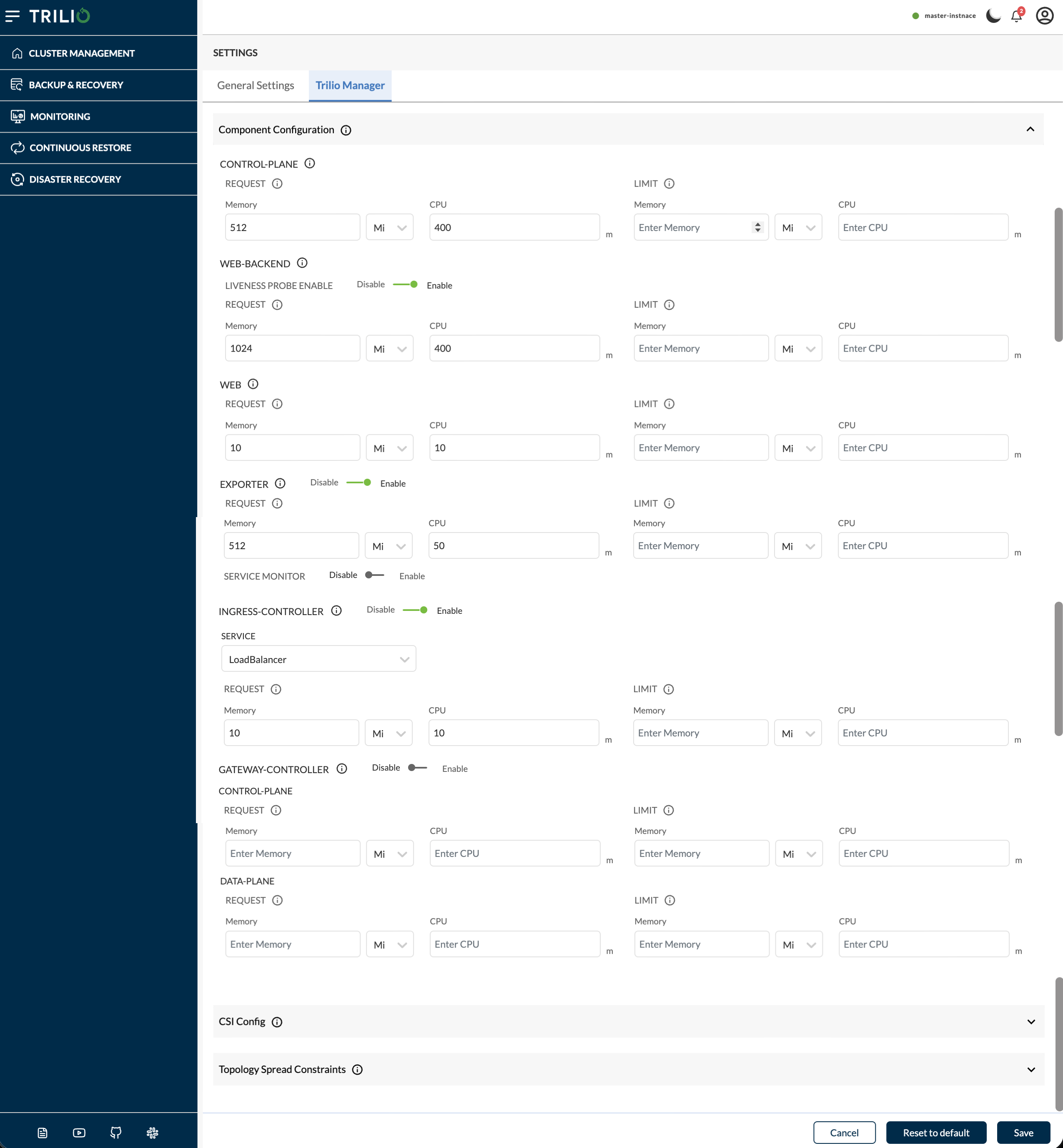
## 5. Component Configuration
Configures resource requests/limits for individual TVK deployment components. Each component follows the same Memory + CPU requests/limits pattern.
| Resource | Minimum Limit |
| -------- | ------------- |
| Memory | ≥ 512 Mi |
| CPU | ≥ 200m |
Component Configuration
***
### 5.1 Control Plane
| Property | Value |
| ----------- | ------------------------------------------------- |
| **Field** | `componentConfigurations.control-plane.resources` |
| **CR Path** | `spec.componentConfiguration.control-plane` |
**Description:** Resources for the **control-plane** deployment. The control plane now also includes the **admission webhook** alongside the TVK controllers (backup, restore, snapshot, analyzer, etc.) responsible for reconciling all TVK Custom Resources.
**Where it is used:**
* Applied to the `k8s-triliovault-control-plane` deployment.
* This is the core of TVK — it handles all backup/restore orchestration, admission webhooks, and resource validation/mutation. Insufficient resources here can slow down reconciliation or impact validation across all TVK operations.
***
### 5.2 Web Backend
| Property | Value |
| -------------- | ----------------------------------------------- |
| **Field** | `componentConfigurations.web-backend.resources` |
| **CR Path** | `spec.componentConfiguration.web-backend` |
| **Additional** | `livenessProbeEnable` (boolean) |
**Description:** Resources for the **web-backend** deployment. The web backend serves the REST API that the TVK UI and CLI interact with.
**Where it is used:**
* Applied to the `k8s-triliovault-web-backend` deployment.
* Handles API requests for listing backups, restores, targets, creating backup plans, etc.
* `livenessProbeEnable` controls whether the Kubernetes liveness probe is active on this deployment.
***
### 5.3 Web (Frontend)
| Property | Value |
| ----------- | --------------------------------------- |
| **Field** | `componentConfigurations.web.resources` |
| **CR Path** | `spec.componentConfiguration.web` |
**Description:** Resources for the **web** (frontend) deployment. This serves the TVK dashboard UI (React application).
**Where it is used:**
* Applied to the `k8s-triliovault-web` deployment.
* Typically lightweight since it serves static frontend assets.
***
### 5.4 Exporter
| Property | Value |
| ----------- | -------------------------------------- |
| **Field** | `componentConfigurations.exporter` |
| **CR Path** | `spec.componentConfiguration.exporter` |
| Sub-field | Type | Description |
| ------------------------ | --------------- | ------------------------------------------------- |
| `enabled` | Boolean | Enable/disable the metrics exporter component |
| `resources` | Requests/Limits | Resource allocation for the exporter pod |
| `serviceMonitor.enabled` | Boolean | Enable/disable Prometheus ServiceMonitor creation |
**Description:** The **exporter** component exposes TVK metrics (backup counts, success/failure rates, durations, etc.) in Prometheus format.
**Where it is used:**
* When enabled, deploys the `k8s-triliovault-exporter` pod that scrapes TVK metrics.
* When `serviceMonitor.enabled` is true, a Prometheus ServiceMonitor CR is created so Prometheus can auto-discover the exporter.
* Useful for monitoring dashboards (Grafana) and alerting.
***
### 5.5 Ingress Controller
| Property | Value |
| ----------- | ------------------------------------------------ |
| **Field** | `componentConfigurations.ingress-controller` |
| **CR Path** | `spec.componentConfiguration.ingress-controller` |
| Sub-field | Type | Description |
| -------------- | --------------- | ----------------------------------------------------------------- |
| `enabled` | Boolean | Enable/disable TVK's built-in ingress controller |
| `service.type` | String | Kubernetes Service type (`LoadBalancer`, `NodePort`, `ClusterIP`) |
| `resources` | Requests/Limits | Resource allocation |
**Description:** TVK ships with an optional built-in ingress controller. If your cluster already has an ingress controller (e.g. NGINX, Traefik), you should leave this **disabled** and use your existing one.
**Where it is used:**
* When enabled, deploys an ingress controller specifically for TVK.
* The `service.type` determines how the ingress controller is exposed externally.
* **Not available on OpenShift** (OpenShift uses Routes instead of Ingress).
***
### 5.6 Gateway Controller
| Property | Value |
| ----------- | ------------------------------------------------ |
| **Field** | `componentConfigurations.gateway-controller` |
| **CR Path** | `spec.componentConfiguration.gateway-controller` |
| Sub-field | Type | Description |
| ------------------------- | --------------- | ------------------------------------------------------------ |
| `enabled` | Boolean | Enable/disable TVK's built-in Gateway controller |
| `control-plane.resources` | Requests/Limits | Resource allocation for the gateway controller control plane |
| `data-plane.resources` | Requests/Limits | Resource allocation for the gateway controller data plane |
**Description:** Deploys the Trilio gateway controller for Gateway API routing. Disable this if you use your own gateway controller (for example, NGINX Gateway Fabric, Istio, or Cilium).
**Where it is used:**
* When enabled, deploys the Trilio gateway controller so TVK can provision Gateway/HTTPRoute resources for the management console.
* When disabled, you must select an existing **Gateway** (and typically a **Section Name**) under [Routing Configuration → Gateway API](#42-gateway-api).
* Shown only when Gateway API is available (not on OpenShift).
***
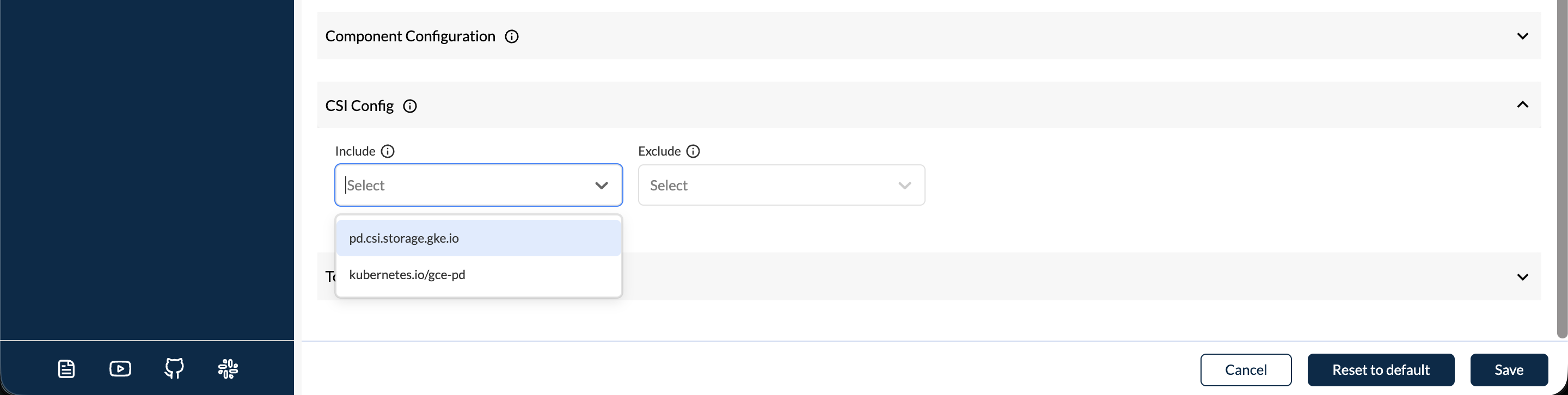
## 6. CSI Configuration
Configures which Container Storage Interface (CSI) drivers fall into the "non-snapshot" category.
CSI Configuration
### 6.1 Include Provisioners
| Property | Value |
| ----------- | ---------------------------------- |
| **Field** | `csiConfig.include` |
| **CR Path** | `spec.csiConfig.include` |
| **Type** | List of strings (CSI driver names) |
**Description:** A list of CSI driver names to be explicitly **included** in the non-snapshot functionality category. For drivers in this list, TVK skips backing up volume data and backs up only the Persistent Volume Claim (PVC) and Persistent Volume (PV) configuration.
**Where it is used:**
* During backup, TVK checks if a PVC's CSI driver is in this list. If yes, it uses the file-based approach (Persistent Volume Claim & Persistent Volume configuration) instead of attempting a VolumeSnapshot.
* Useful for CSI drivers that are fully functional for provisioning but do not support the Kubernetes VolumeSnapshot API.
***
### 6.2 Exclude Provisioners
| Property | Value |
| ----------- | ---------------------------------- |
| **Field** | `csiConfig.exclude` |
| **CR Path** | `spec.csiConfig.exclude` |
| **Type** | List of strings (CSI driver names) |
**Description:** A list of CSI driver names to be explicitly **excluded** from the non-snapshot functionality category. Even if TVK auto-detects them as non-snapshot capable, they will be treated as snapshot-capable.
**Where it is used:**
* Overrides TVK's auto-detection for specific CSI drivers.
* Useful when a CSI driver supports snapshots but TVK incorrectly classifies it as non-snapshot capable.
***
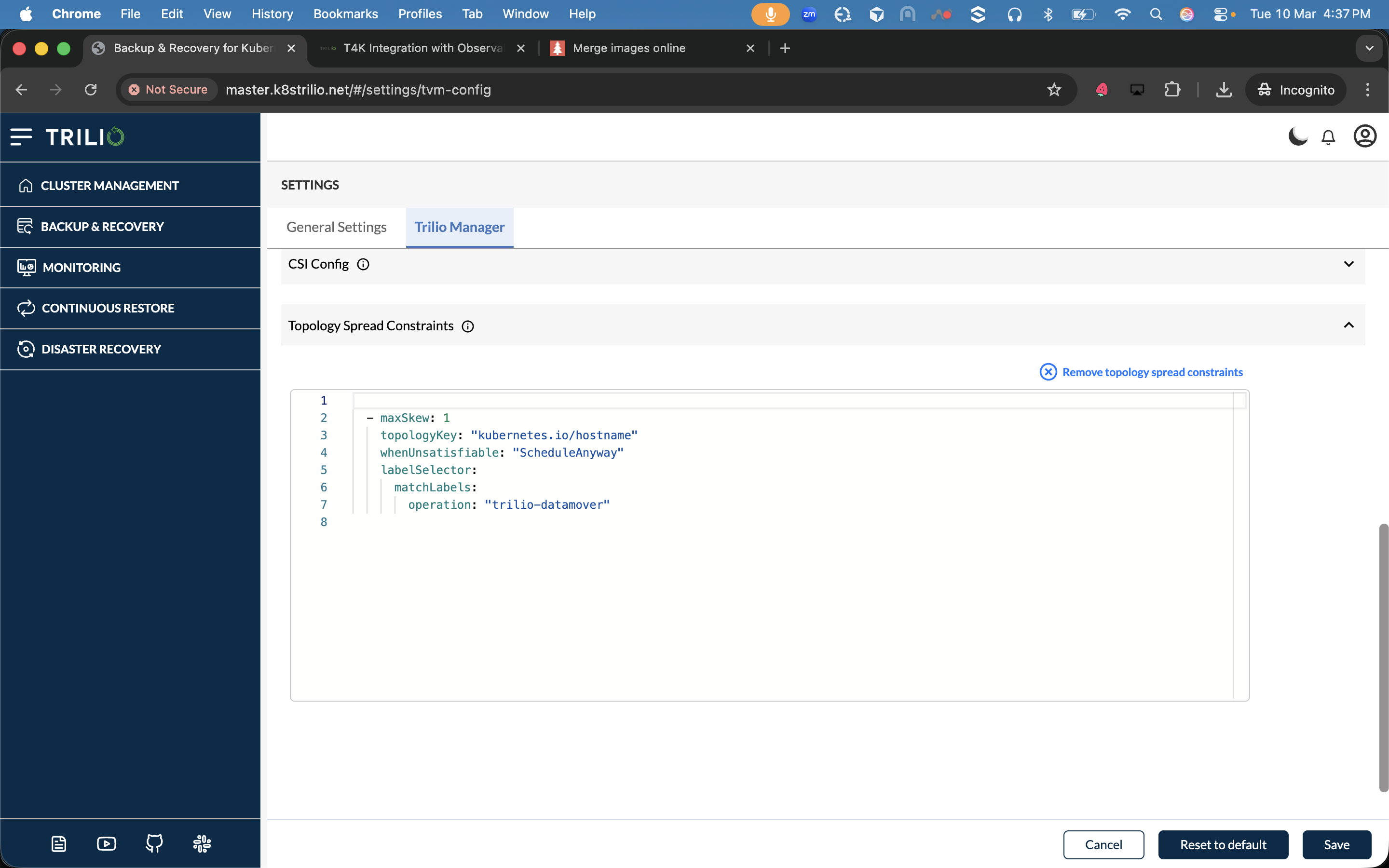
## 7. Topology Spread Constraints
| Property | Value |
| ----------- | ----------------------------------------------------------- |
| **Field** | `workerJobsSchedulingConfig.topologySpreadConstraints` |
| **CR Path** | `spec.workerJobsSchedulingConfig.topologySpreadConstraints` |
| **Type** | YAML (list of Kubernetes TopologySpreadConstraint objects) |
**Description:** Defines Kubernetes Topology Spread Constraints for TVK worker job pods and data mover pods. This controls how these pods are distributed across your cluster's topology domains (nodes, zones, regions).
Topology Spread Constraints
Use topology spread constraints to improving availability and resource utilization. For example, using `topologyKey: kubernetes.io/hostname` ensures pods are spread across all nodes before placing multiple on the same node. [More info](https://kubernetes.io/docs/concepts/scheduling-eviction/topology-spread-constraints/)
**Where it is used:**
* Applied to the PodSpec of all TVK worker jobs (metadata jobs, data jobs, hook executors, etc.) and data mover pods.
* Ensures backup/restore workloads are evenly distributed across failure domains, improving resilience.
***
## 8. Actions
### Save
Validates all fields and updates the `TrilioVaultManager` CR on the cluster. The TVK operator reconciles the changes and rolls out updated configurations to affected components.
### Reset to Default
Resets all fields to the factory default values defined in the TVK Helm chart. This fetches the default configuration from the `/tvm-default-settings` API endpoint.
### Cancel
Discards unsaved changes and reverts to the last saved configuration.
***