# Policies - Actions

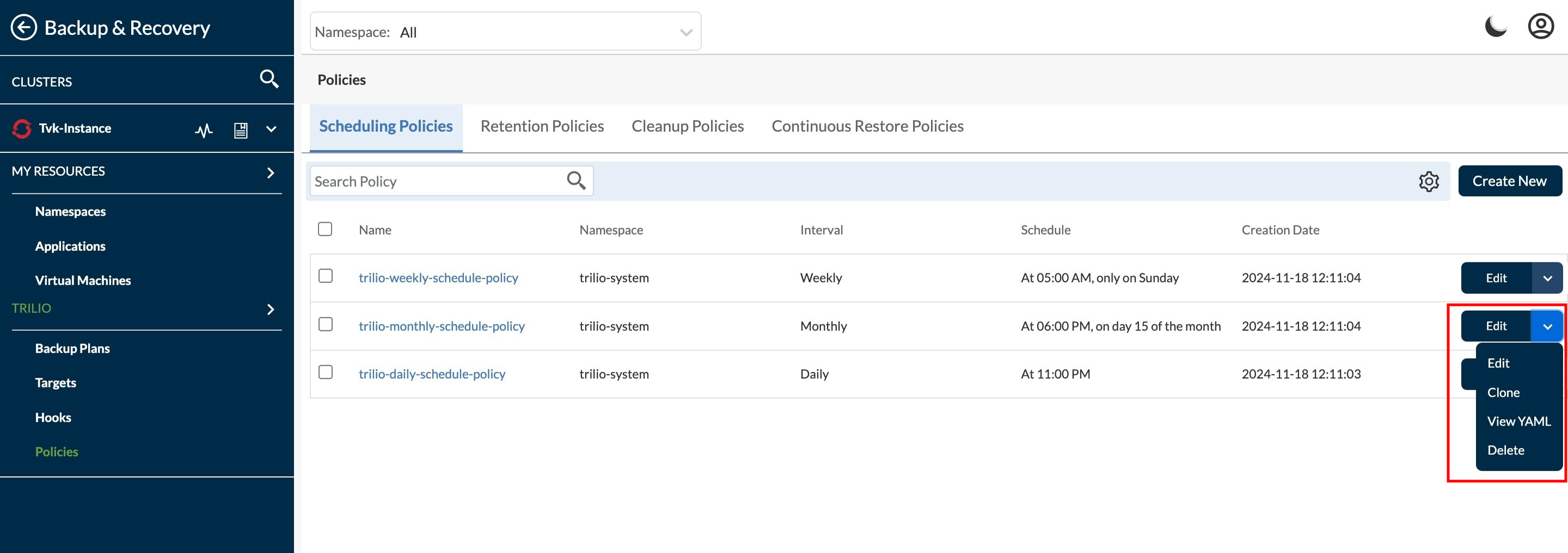
This page explain the action items and its working for Policies. Select the policy for which user want to perform some actions.

<figure><img src="https://2128071491-files.gitbook.io/~/files/v0/b/gitbook-x-prod.appspot.com/o/spaces%2FVPjqWuFyXH70qgk8Bj5Q%2Fuploads%2Fgit-blob-57a30f95ecef35fb254ab892a546d316996ca983%2Fpolicy%20action.jpeg?alt=media" alt=""><figcaption></figcaption></figure>

1. Edit action - This edits the existing policy. Apart from **Namespace** and **Name** user can edit all other fields.
   1. Edit Schedule policy page\
      ![](https://2128071491-files.gitbook.io/~/files/v0/b/gitbook-x-prod.appspot.com/o/spaces%2FVPjqWuFyXH70qgk8Bj5Q%2Fuploads%2Fgit-blob-a3e5ffc59236d8ac478d2bbee77927c1c7435535%2Fedit%20sch%20policy.jpeg?alt=media)
   2. Edit Retention policy page\
      ![](https://2128071491-files.gitbook.io/~/files/v0/b/gitbook-x-prod.appspot.com/o/spaces%2FVPjqWuFyXH70qgk8Bj5Q%2Fuploads%2Fgit-blob-9fa8b89a769731ffd9ab5c1c0da77cf1d3030e0e%2Fedit%20ret%20policy.jpeg?alt=media)
   3. Edit Cleanup policy page\
      ![](https://2128071491-files.gitbook.io/~/files/v0/b/gitbook-x-prod.appspot.com/o/spaces%2FVPjqWuFyXH70qgk8Bj5Q%2Fuploads%2Fgit-blob-36dfa8de9ad05029dd2a4a27bc3f09684f265632%2Fclone%20by%20suffix.jpeg?alt=media)
   4. Edit Continuous Restore policy page\
      ![](https://2128071491-files.gitbook.io/~/files/v0/b/gitbook-x-prod.appspot.com/o/spaces%2FVPjqWuFyXH70qgk8Bj5Q%2Fuploads%2Fgit-blob-0edd1c202fdcd8c1a0cc546e16d30e2e5875fb0e%2Fedit%20cr%20policy.jpeg?alt=media)
2. Clone action - This clone the existing policy in another namespaces with same detail.
   1. Select Namespace - First step is to select the Namespaces in which user want to clone the policy.\
      ![](https://2128071491-files.gitbook.io/~/files/v0/b/gitbook-x-prod.appspot.com/o/spaces%2FVPjqWuFyXH70qgk8Bj5Q%2Fuploads%2Fgit-blob-c89131d422e24101ffe0ddce4c5da516faf42581%2Fclone%20policy%20ns.jpeg?alt=media)\
      \
      Click on the **Clone** button after selecting the namespaces to move to next step.
   2. Policy name by "By Name" - Here, the user can set a name for the cloned policy by a text.\
      ![](https://2128071491-files.gitbook.io/~/files/v0/b/gitbook-x-prod.appspot.com/o/spaces%2FVPjqWuFyXH70qgk8Bj5Q%2Fuploads%2Fgit-blob-445e7697a4d0fdee9a45e8884c97961479569bb8%2Fclone%20policy%20name.jpeg?alt=media)\
      \
      Click on the **Clone** button if user wish to clone by policy name.
   3. Policy name by "By Suffix" - Here, the user can set a name for the cloned policy by a suffix.\
      ![](https://2128071491-files.gitbook.io/~/files/v0/b/gitbook-x-prod.appspot.com/o/spaces%2FVPjqWuFyXH70qgk8Bj5Q%2Fuploads%2Fgit-blob-36dfa8de9ad05029dd2a4a27bc3f09684f265632%2Fclone%20by%20suffix.jpeg?alt=media)\
      \
      Click on the **Clone** button to clone the policy by suffix.
3. View YAML action - This shows the policy detail in yaml file format.\
   ![](https://2128071491-files.gitbook.io/~/files/v0/b/gitbook-x-prod.appspot.com/o/spaces%2FVPjqWuFyXH70qgk8Bj5Q%2Fuploads%2Fgit-blob-57712a6cc82b0570ffde19d4a91d4bc39847fc4e%2Fview%20yaml.jpeg?alt=media)\
   \
   If user want to download it, user can click on 'Download' button to download this in YAML file format.
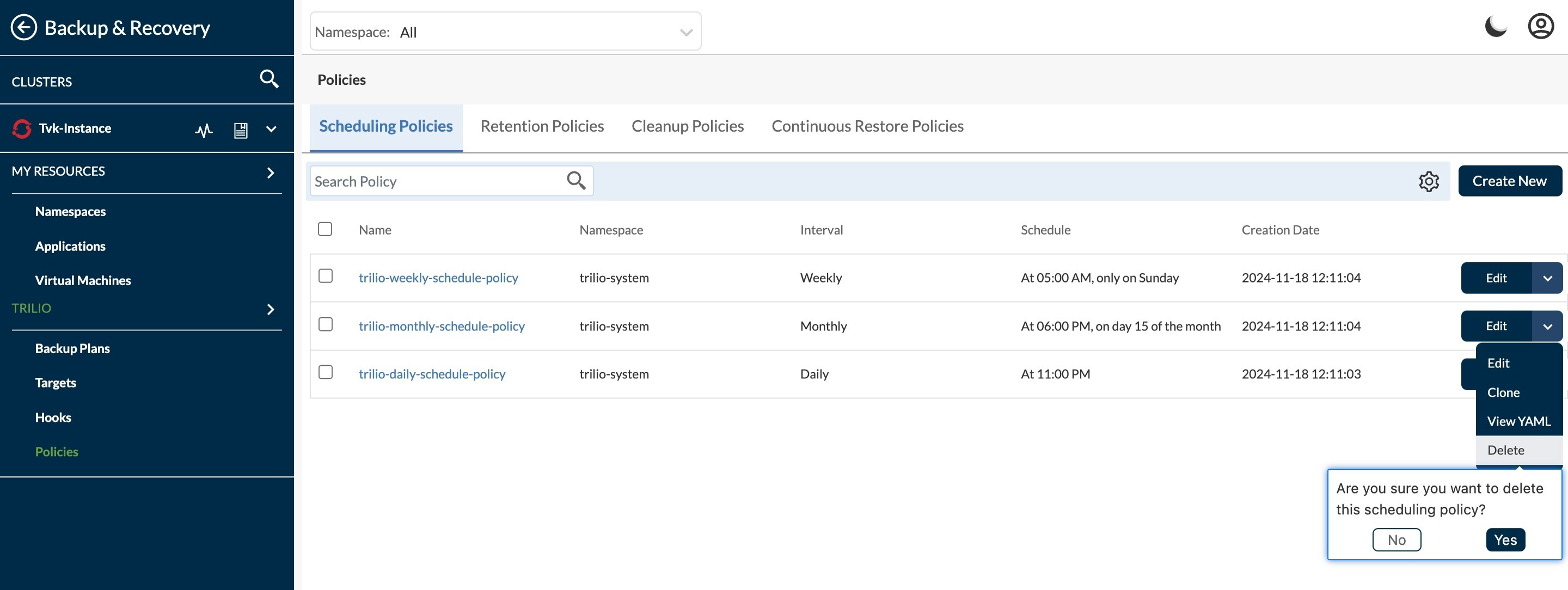
4. Delete action - This is to delete the policy.

   <figure><img src="https://2128071491-files.gitbook.io/~/files/v0/b/gitbook-x-prod.appspot.com/o/spaces%2FVPjqWuFyXH70qgk8Bj5Q%2Fuploads%2Fgit-blob-f069e057e43f1947e29d8e387648838b1ddbb43f%2Fdelete%20policy.jpeg?alt=media" alt="Create Backup options"><figcaption></figcaption></figure>

   To confirm the delete, click on 'Yes' else click on 'No'.

#### Compare YAML

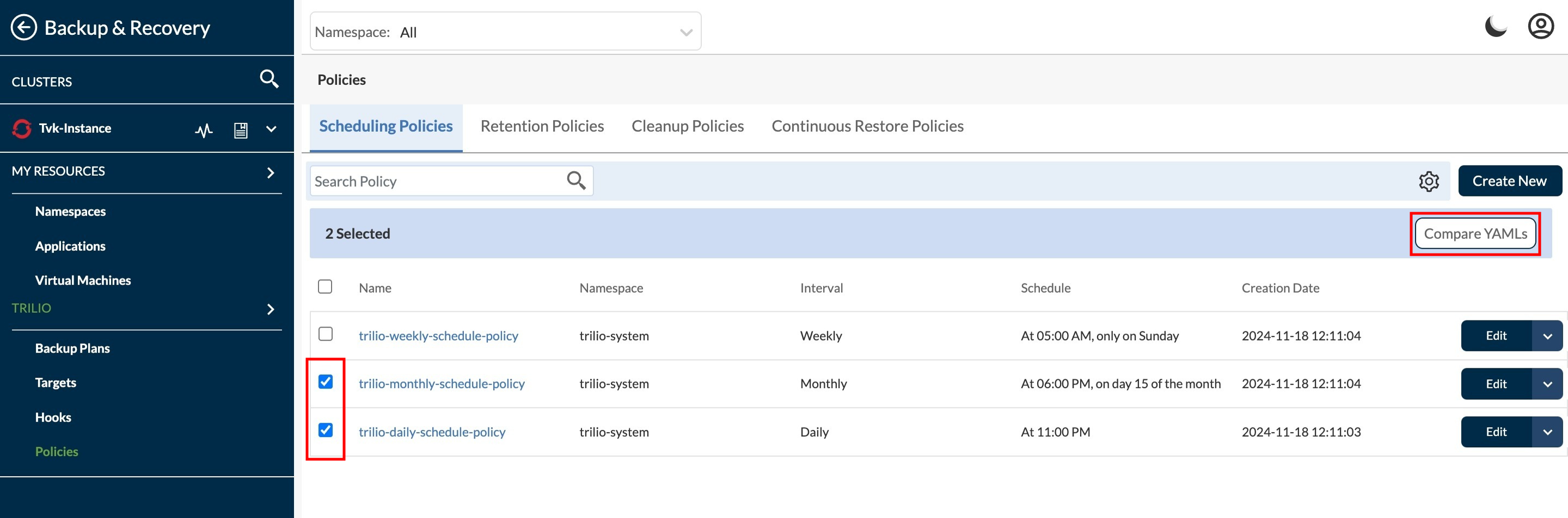
This is to view and compare the YAML files for 2 policies. Check below options.

<figure><img src="https://2128071491-files.gitbook.io/~/files/v0/b/gitbook-x-prod.appspot.com/o/spaces%2FVPjqWuFyXH70qgk8Bj5Q%2Fuploads%2Fgit-blob-181ab808530c392ae487975858cf76251dd7c2ae%2Fcompare%20yaml.jpeg?alt=media" alt="Create Backup options"><figcaption></figcaption></figure>

* Select checkbox - Select the policies for which user want to compare the YAMLs.
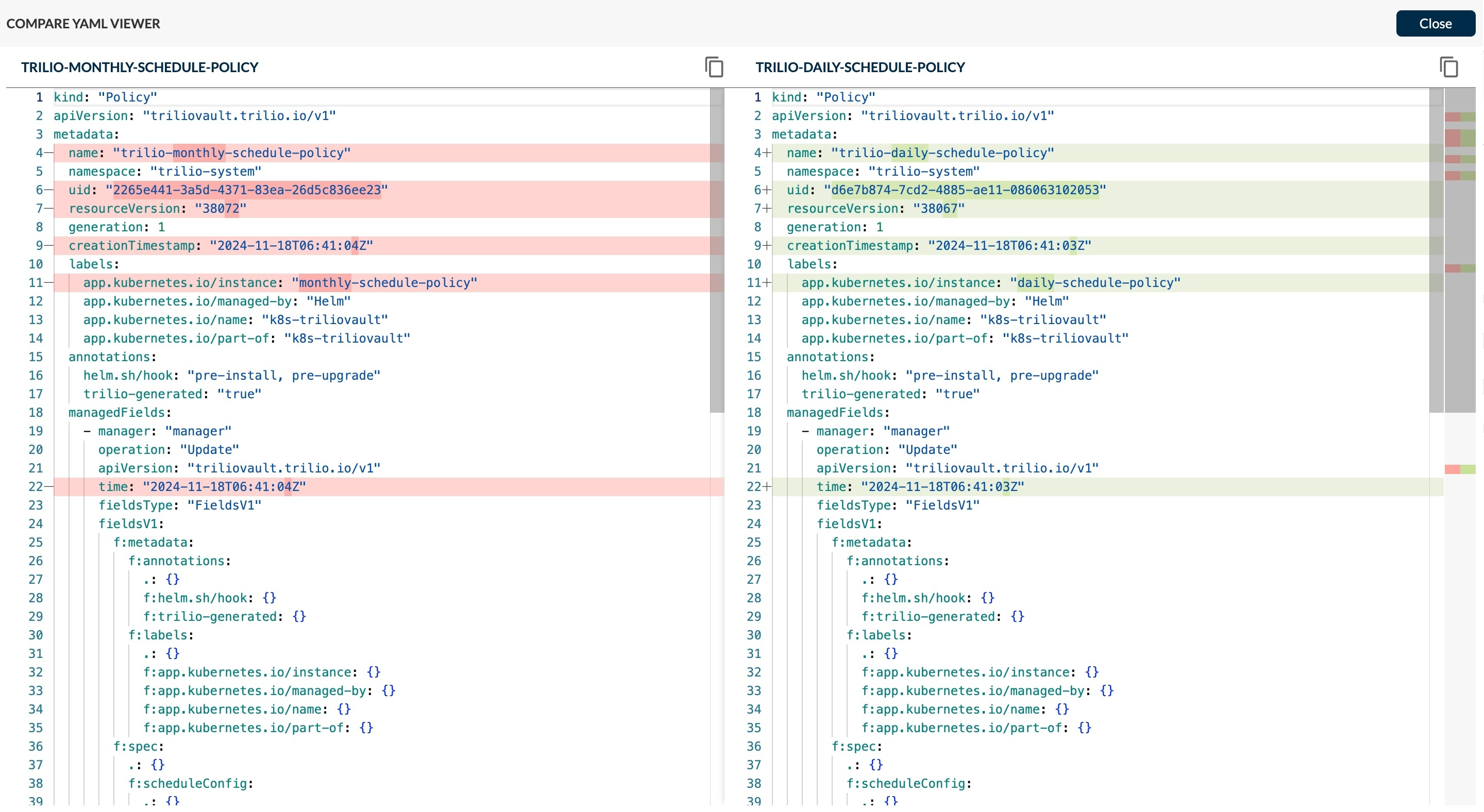
* Compare YAML - click on this button see the compare YAML files of selected policies. Below compare view is visible on click on Compare YAML option.

  <figure><img src="https://2128071491-files.gitbook.io/~/files/v0/b/gitbook-x-prod.appspot.com/o/spaces%2FVPjqWuFyXH70qgk8Bj5Q%2Fuploads%2Fgit-blob-08ea34fa134b7053935e63bcc242d474e57cb3c6%2Fcompare%20yaml%20view.jpeg?alt=media" alt="Create Backup options"><figcaption></figcaption></figure>

  FRom here user can copy the content of policy in YAML format.