# Hooks - Actions

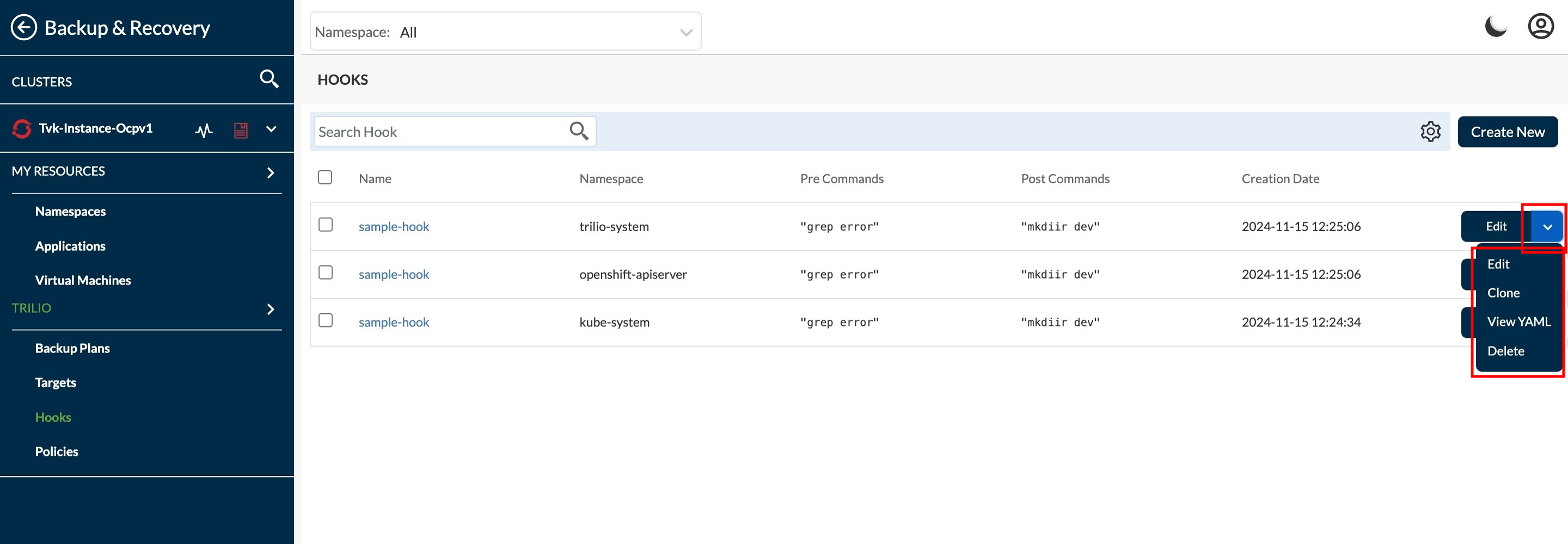
This page explain the action items and its working for Hooks. Select the hook for which user want to perform some actions.\\

<figure><img src="https://2128071491-files.gitbook.io/~/files/v0/b/gitbook-x-prod.appspot.com/o/spaces%2FVPjqWuFyXH70qgk8Bj5Q%2Fuploads%2Fgit-blob-d5a24b5281ed7ea04b24455a4229e403410f026f%2Fhook%20action%20options.jpeg?alt=media" alt=""><figcaption></figcaption></figure>

1. Edit action - This edits the existing hook. Apart from **Namespace** and **Name** user can edit all other fields.\
   ![](https://2128071491-files.gitbook.io/~/files/v0/b/gitbook-x-prod.appspot.com/o/spaces%2FVPjqWuFyXH70qgk8Bj5Q%2Fuploads%2Fgit-blob-314e19c5aec7573ccd0f103936555dca0fd04aa8%2Fedit%20hook.jpg?alt=media)
2. Clone action - This clone the existing Hook in another namespaces with same detail.
   1. Select Namespace - First step is to select the Namespaces in which user want to clone the hook.\
      ![](https://2128071491-files.gitbook.io/~/files/v0/b/gitbook-x-prod.appspot.com/o/spaces%2FVPjqWuFyXH70qgk8Bj5Q%2Fuploads%2Fgit-blob-36314d5f0c5f03637d7006c007396033d28fbc8a%2Fclone%20select%20ns.jpeg?alt=media)\
      \
      Click on the **Clone** button after selecting the namespaces to move to next step.
   2. Hook name by "By Name" - Here, the user can set a name for the cloned hook by a text.\
      ![](https://2128071491-files.gitbook.io/~/files/v0/b/gitbook-x-prod.appspot.com/o/spaces%2FVPjqWuFyXH70qgk8Bj5Q%2Fuploads%2Fgit-blob-13b790fd29b48ed6fc79407276f3eca7a73c67ab%2Fclone%20hook%20by%20name.jpeg?alt=media)\
      \
      Click on the **Clone** button if user wish to clone by hook name.
   3. Hook name by "By Suffix" - Here, the user can set a name for the cloned hook by a suffix.\
      ![](https://2128071491-files.gitbook.io/~/files/v0/b/gitbook-x-prod.appspot.com/o/spaces%2FVPjqWuFyXH70qgk8Bj5Q%2Fuploads%2Fgit-blob-36dfa8de9ad05029dd2a4a27bc3f09684f265632%2Fclone%20by%20suffix.jpeg?alt=media)\
      \
      Click on the **Clone** button to clone the hook by suffix.
3. View YAML action - This shows the hooks detail in yaml file format.\
   ![](https://2128071491-files.gitbook.io/~/files/v0/b/gitbook-x-prod.appspot.com/o/spaces%2FVPjqWuFyXH70qgk8Bj5Q%2Fuploads%2Fgit-blob-57712a6cc82b0570ffde19d4a91d4bc39847fc4e%2Fview%20yaml.jpeg?alt=media)\
   \
   If user want to download it, user can click on 'Download' button to download this in YAML file format.
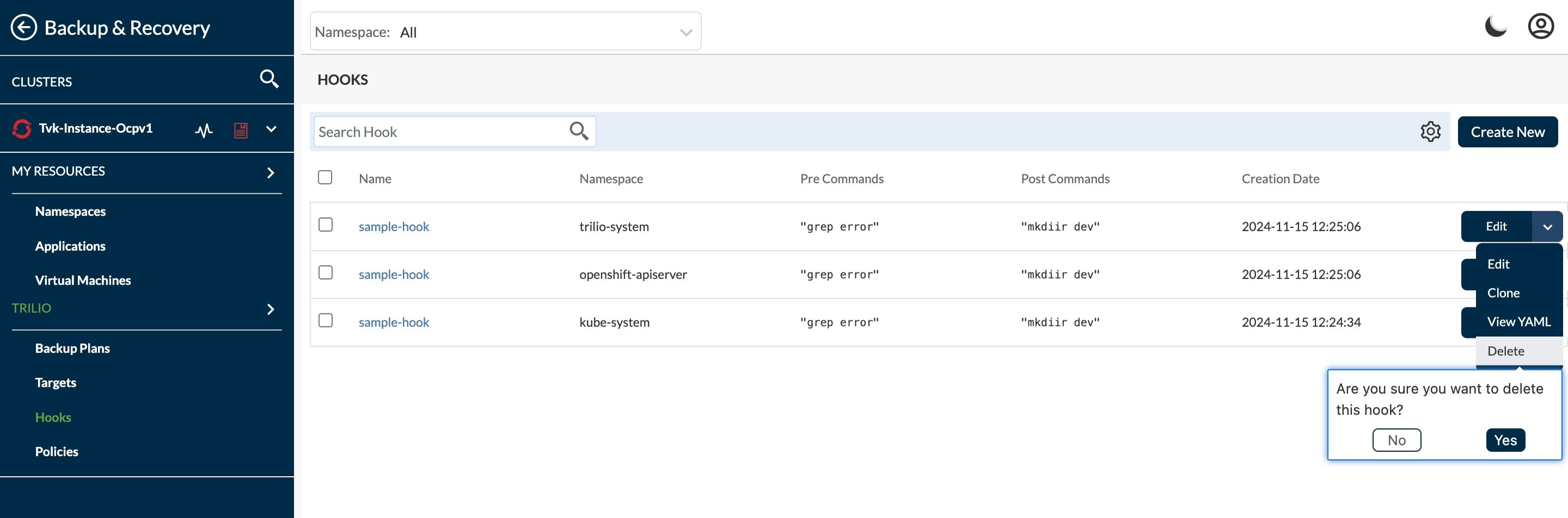
4. Delete action - This is to delete the hook.

   <figure><img src="https://2128071491-files.gitbook.io/~/files/v0/b/gitbook-x-prod.appspot.com/o/spaces%2FVPjqWuFyXH70qgk8Bj5Q%2Fuploads%2Fgit-blob-0eb4c7a21517083fa14b713f2481a9ec09a4052e%2Fdelete%20hook.jpeg?alt=media" alt="Create Backup options"><figcaption></figcaption></figure>

   To confirm the delete, click on 'Yes' else click on 'No'.